

In this article we will explore two related use cases, using caches to improve performance. The use cases are probably very familiar to engineers coming from a front-end background, but I rarely see documentation on the concepts used within a back-end context. The use cases are based off real world scenarios we’ve encountered in CyberSift. I use Java Caffeine here, but the concepts apply to any cache.
Use case 1 – Debouncing
Scenario
Say you have to keep track of the “last time of contact” from a number of hosts. The hosts are each sending events in a stream to a processor. For every log received, the processor would write a timestamp to the database, as illustrated below:

There are a couple of performance issues with this approach once you start to scale. The most obvious is that the database is written to with every log received, so as more hosts and more logs are added, the busier your database becomes. This is exacerbated by the less obvious problem known as the “thundering herd” problem. Say your processor has a momentary outage or a host is temporarily down and communication between host and processor is broken. Your hosts now have a backlog of logs to send to the processor, which is struggling to keep up with the sudden higher influx of logs because database connection pools are exhausted quicker, and so on.
Debouncing
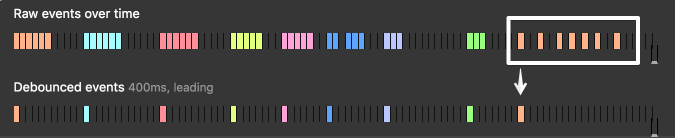
A cache may act as a debouncer. Two concepts need to be understood:
- As illustrated above, debouncing means collapsing a number of consecutive events into a single event.
- Caches typically follow some kind of expiration/eviction policy. This controls when a key-value pair are removed from the cache. Caffeine has a couple such policies, such as expire after write, where an entry is removed after a certain amount of time has past since the last time the entry was written to. In this scenario, we will use expire after create, which will expire an entry after a certain amount of time has passed since it’s creation, irrespective of how many times it was since read/written. The policy allows us to call a function whenever a cache entry is removed. This is very well illustrated in the following example from Caffeine’s author:
https://stackoverflow.com/questions/51779879/caffeine-how-expires-cached-values-only-after-creation-time
Adapting this concept into our scenario we get the following:
- Whenever a host log is seen, record the hostname and timestamp in the cache
- Set an expire after create policy
- Evicts an entry 5 minutes after creation
- On eviction, writes the key-value pair to the database
- Any subsequent host logs within those 5 minutes hit the cache instead of the database

Using this approach, instead of hitting the database with every log entry, we instead write to the database at most once per host every 5 minutes.
✅ Depending on your events/logs per second you will get significant performance enhancements by avoiding a very large number of database writes
⚠️ What you gain in performance you sacrifice in granularity. Your recorded timestamps are now not as precise, and have an error windows of at most 5 minutes.
🪧 Tuning the 5 minute expiration policy variable will allow you to tune performance vs precision
Use case 2 – Binning
Scenario
This use case is very similar to that presented above. The only difference is that instead of recording “last seen” we’d like to record the number of log seen from each host in a 5 minute window
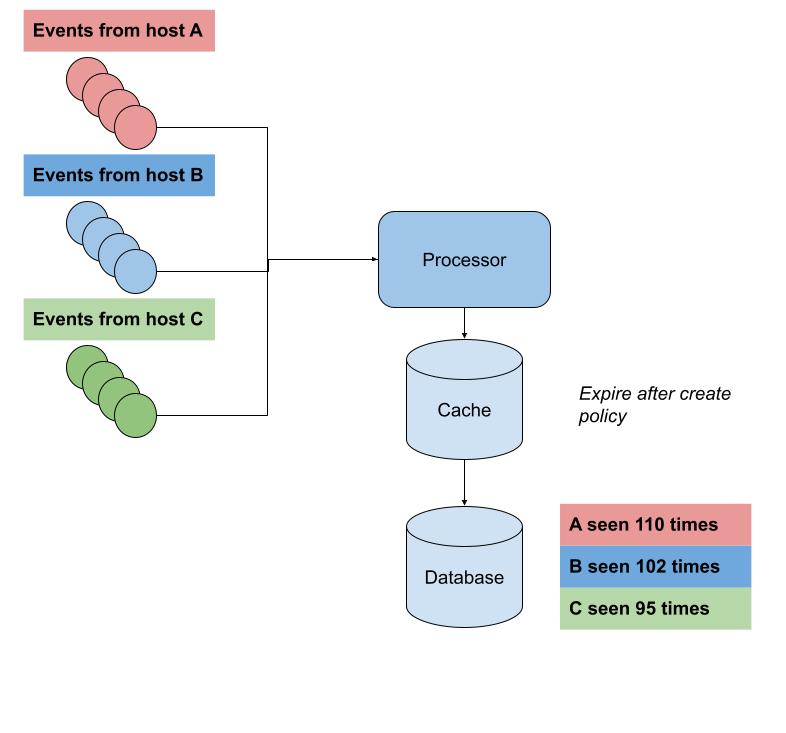
Again the naive approach would be to simply increment a counter in the database whenever a log is seen from a host, but we run into the same issues described above.
Binning
Binning is typically used whenever you build a histogram. Events are placed in 5 minute “bins” and counted that way. The below illustrates an example of binning:
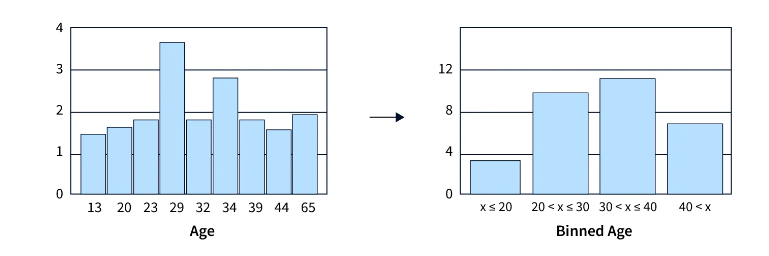
Our cache once again comes to the rescue. Modifying our pseudocode above by a little, we get:
- Whenever a host log is seen, record the hostname and a counter set to “1” in the cache
- Set an expire after create policy
- Evicts an entry 5 minutes after creation
- On eviction, writes the key-value pair to the database
- Any subsequent host logs within those 5 minutes hit the cache and increment the counter
The net result of the above is that every 5 minutes the cache will write a “hostname: counter” entry to the database.
✅ Depending on your events/logs per second you will get significant performance enhancements by avoiding a very large number of database writes
⚠️ What you gain in performance you sacrifice in potential data loss. If your cache faces problems or is restarted, you will lose at most 5 minutes worth of counters
🪧 Tuning the 5 minute expiration policy variable will allow you to tune performance vs data loss tolerance
 David Vassallo's Blog
You must be logged in to post a comment.