

Introduction
this is an extract and sample of some of the work we do while pentesting in CyberSift
Flutter and the underlying dart engine do not respect certificate and proxy system settings. Sometimes, frameworks like reFlutter dont work 😢 The below helps get around this. The idea at a high level is to:
- Setup a burpsuite transparent proxy
- Transfer the burpsuite CA to a rooted android device
- Setup a DNS server which responds to host queries you are interested in with the burpsuite IP instead of the real IP. This would make the device send requests to the host to burpsuite instead
- Change your android device DNS settings to point to this DNS server
- Profit
Procedure
Pre-requisites
- Burpsuite installed
- Python3 installed
- Working android studio installed
- An android virtual device setup and working (this is usually done through Android Studio)
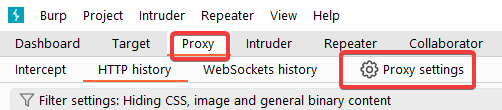
Setup Burpsuite
- Under Proxy, open
Proxy Settings
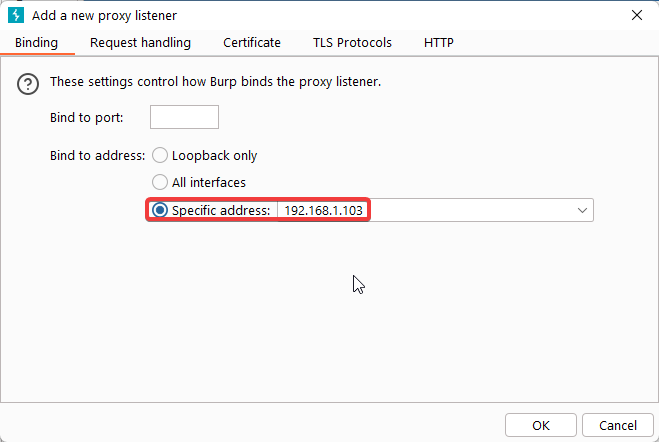
- Add a new proxy listener
- Make sure you listen on a specific address, and make a note of said address (in my example,
192.168.1.103)
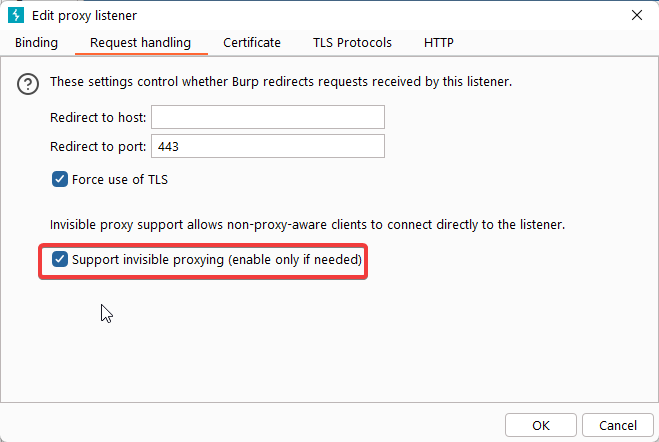
- Under Request handling, make sure invisible proxying is allowed
- You should end up with something like this (the redirect part is optional):
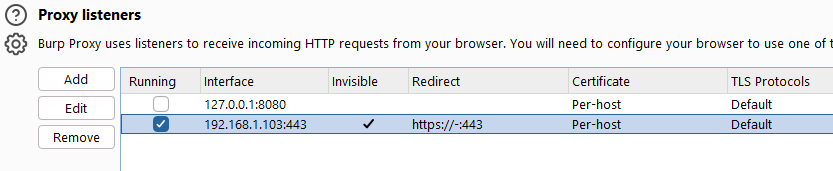
✅ Burpsuite will now intercept any HTTPS coming in on that IP ✅
- Export the CA certificate for the next step:
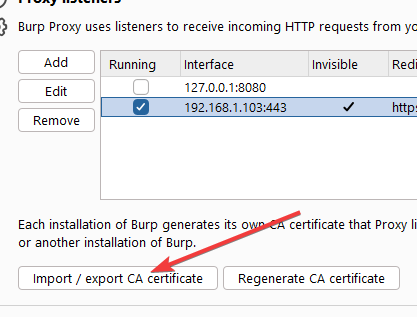
Setup your Android Virtual Device [AVD]
- We first need to import burpsuite’s CA into our (rooted) device. First we need to convert the
.dercertificate we exported into a.pem. We also need to rename the certificate to the naming convention used by Android. To do so:
openssl x509 -inform der -in CERT_FROM_ABOVE -out certificate.pem
openssl x509 -inform PEM -subject_hash_old -in certificate.pem | head -1
# the above line will output a shot hexadecimal string.
# in my case it was "9a5ba575"
# android requires us to name our CA certiicate the above, appended with .0
mv certificate.pem 9a5ba575.0
- Boot the AVD in root mode and transfer over the CA certificate:
# set the ANDROID_SDK_ROOT env variable and start the emulator
SET ANDROID_SDK_ROOT=C:\Users\davev\AppData\Local\Android\Sdk && "C:\Users\davev\AppData\Local\Android\Sdk\emulator\emulator.exe" -avd cybersift_eml -writable-system

adb root
adb shell avbctl disable-verification
adb reboot

# wait...
# wait...
# wait...

adb root
adb remount

adb push 9a5ba575.0 /sdcard
adb shell

mount -o rw,remount /system
cp /sdcard/9a5ba575.0 /system/etc/security/cacerts
chmod 644 /system/etc/security/cacerts/9a5ba575.0
chown root:root /system/etc/security/cacerts/9a5ba575.0
exit

adb reboot
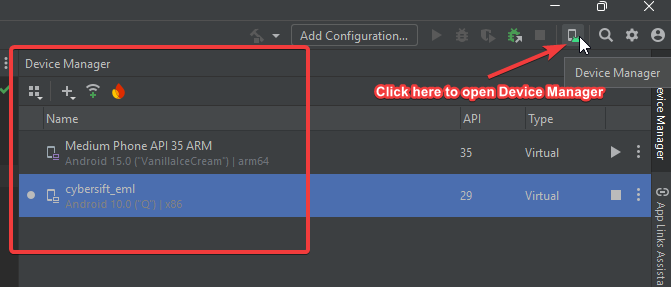
⚠️ The above was run in windows… the important thing is to make sure you start the emulator by setting ANDROID_SDK_ROOT env variable properly. You can find this through Android Studio:
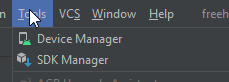
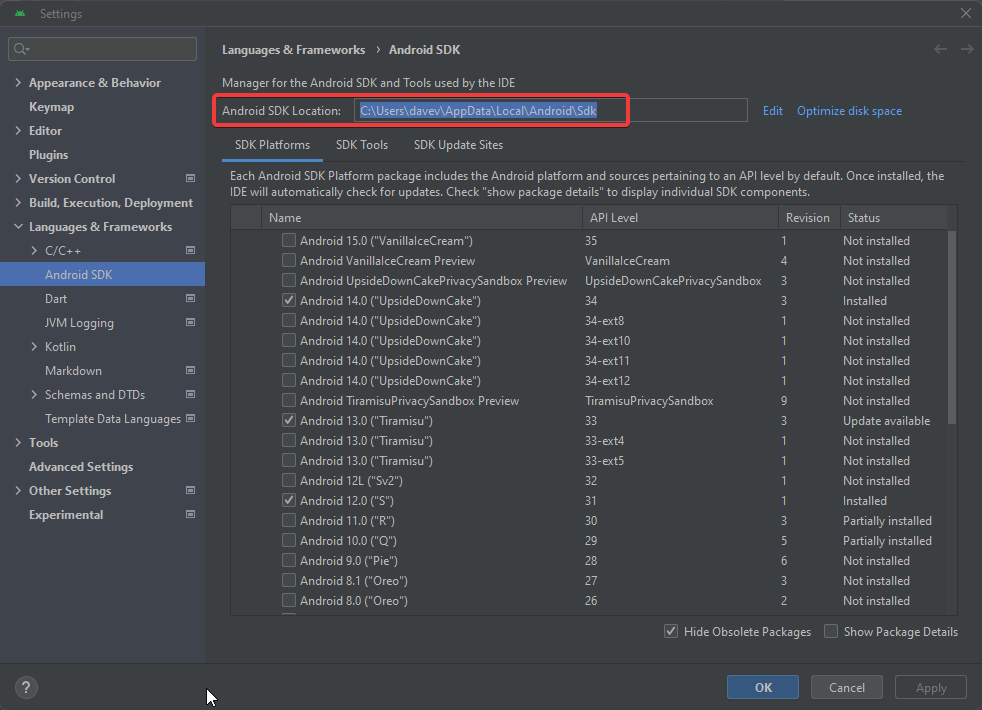
⚠️ make sure to reboot the AVD after you transfer the CA certificate
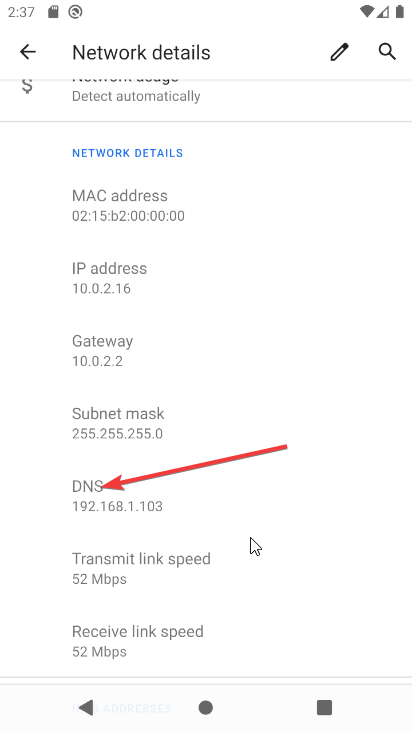
- Your AVD now needs to get it’s DNS server address changed. We are going to spoof the IP of whatever we want to intercept. DO this via the network settings. Make a note of the IP already used by the device, and set the device to use static IP. Use the same IP details as before, just change the DNS server
Setup your DNS server
Use the below code:
from dnslib import DNSRecord, RR, QTYPE, A
from dnslib.server import DNSServer
import socket

# IP address to override - set this to your BURPSUITE IP
OVERRIDE_IP = "192.168.1.103"
# CHANGE THIS to whatever you'd like to intercept!
# NB - there's a dot at the end!
DOMAIN_TO_OVERRIDE = "example.com."


FORWARD_DNS = "8.8.8.8"  # Forward to Google's public DNS server

class OverrideDNSResolver:
    def resolve(self, request, handler):
        # Parse the DNS request
        reply = request.reply()
        qname = str(request.q.qname)

        # Check if the requested domain is demo.com
        if qname == DOMAIN_TO_OVERRIDE:
            print("OVERRIDE_IP")
            # Add a response for demo.com with the overridden IP
            reply.add_answer(RR(qname, QTYPE.A, rdata=A(OVERRIDE_IP), ttl=60))
        else:
            # Forward the request to another DNS server (e.g., Google's 8.8.8.8)
            reply = self.forward_request(request)

        return reply

    def forward_request(self, request):
        # Send the request to the forward DNS server
        try:
            # Convert the request to bytes
            request_data = request.pack()
            # Create a socket to communicate with the upstream DNS server
            sock = socket.socket(socket.AF_INET, socket.SOCK_DGRAM)
            sock.settimeout(2)
            # Send the request to the upstream DNS server
            sock.sendto(request_data, (FORWARD_DNS, 53))
            # Receive the response from the upstream DNS server
            response_data, _ = sock.recvfrom(4096)
            # Parse the response and return it
            return DNSRecord.parse(response_data)
        except Exception as e:
            print(f"Error forwarding request: {e}")
            return request.reply()  # Return an empty reply on failure

# Create a resolver instance
resolver = OverrideDNSResolver()

# Bind the DNS server to the localhost and port 53
server = DNSServer(resolver, port=53, address="0.0.0.0", tcp=False)

# Start the server
print("Starting DNS server on 0.0.0.0:53...")
server.start_thread()

# Keep the server running
try:
    while True:
        pass
except KeyboardInterrupt:
    print("DNS server stopped.")
- Run the above with
pythonand leave it running in the background
⭐ It’s useful keeping an eye on this to see what hosts the app is trying to contact
✅Load up your APK in the AVD (usually just a drag / drop into the AVD) and go to town. Burpsuite should show entries✅
 David Vassallo's Blog
You must be logged in to post a comment.